
This article was written last year when we were building the landing page. It was originally written at the time, but AI has advanced so quickly that publishing it now makes the content outdated... It's amazing how quickly AI is advancing. Considering that it will accelerate even further by 2026, designers will need to keep up with how they work and stay up to date on information, or they'll be left behind... It's truly amazing. FigmaMake and Gemini3 can now do so much more. I hope you'll just skim through this article, thinking of it as the diary of a designer who makes full use of AI but is also overwhelmed by its evolution. I'll also add supplementary text (aka comments) in the parts I've added, so please enjoy it as a secondary audio commentary.
Hello!
My name is Hasshi and I work as a UI designer at Liberogic Inc.
In my previous article, I enthusiastically reported that I had created a rough draft of a landing page in just three hours using FigmaMake and Gemini.
This is the result of the previous work.
Please see the previous article here.
[Make and Use FigmaMake: Part 1] 3 hours with FigmaMake and Gemini! A new generation web production flow for creating a rough landing page that will speed up the "red ink" process for busy CEOs
https://www.liberogic.jp/topics/20250723-figmamake/
This article is the second half of that.
After reporting to the president, I felt good.

With this, we can respond to even the president's unreasonable requests in record time!

With this quality in 3 hours, there's no way to complain!
...There was a time when I thought like that too lol
This time, I submitted it to the president with great enthusiasm.
"Hell's Revision"We will deliver ⭐️・:*+.\(( °ω° ))/.:+✨
To sum up,
That beautiful layout I created with FigmaMake disappeared without a trace after the president's comment.
I believe this will continue to happen even now that AI has evolved.
Lesson learned: FigmaMake is great for creating dashboards and wires, but it might not be ready for creating emotional landing pages.
AI has been evolving rapidly recently, and it can now be used in a variety of ways. It's amazing!
President's presentation: The barrier of "make it look good"
I was full of confidence when I showed the CEO the SaaS-style landing page proposal I had created last time, which was pretty well done.
.png)
President! I used AI to create a rough draft of that LP in super-fast time! What do you think of the structure?

Wow, that was quick. (Looking at the screen)... Hmm, but it's kind of hard."

Is it too stiff? (No, it's a B2B service that requires trust, so it's better to be this organized...)

Can't you make it more exciting, or make it have a big impact and a sharper feel? Also, add some movement and decoration to make it look "nice"?
There it is."Make it look good."
This is the number one instruction that all designers fear the most and that AI has the hardest time understanding.
I'm often told things like "it looks good" or "it looks rushed." It's important to understand the deeper meaning of those words. We're living in an age where designers are also being tested on their communication skills. As someone with poor communication skills and a sense of insecurity, it's difficult for me, so every day is a training session... (If communication skills were so important to designers, I would have trained them more from a young age... sigh.)
When working with clients, we dig deeper into the other person's psychology and what they want, but the president is very busy and doesn't have much time to listen to them.
Because of the relationship between the president and employees, things can get a bit lax and requests can end up being made using random words.
Then we enter the phase where we all work together to digest and re-create the words of the busy president.
This was just an excuse. It was just an excuse on my part.
inner voice(What do you mean by "it looks good"? Even Gemini-sensei can't read that far! Can you please stop giving correction instructions using only onomatopoeic words like "boom" and "whoosh"?)
This feeling hasn't changed even now
FigmaMake VS the CEO's brutal comments
From there the real battle began.
In order to embody the "good feeling" that the president has in his mind, we make corrections to the base created in FigmaMake...
This is where tool compatibility comes into play.
FigmaMake only generates"Logically correct web layout"A beautiful box layout created with Auto Layout.
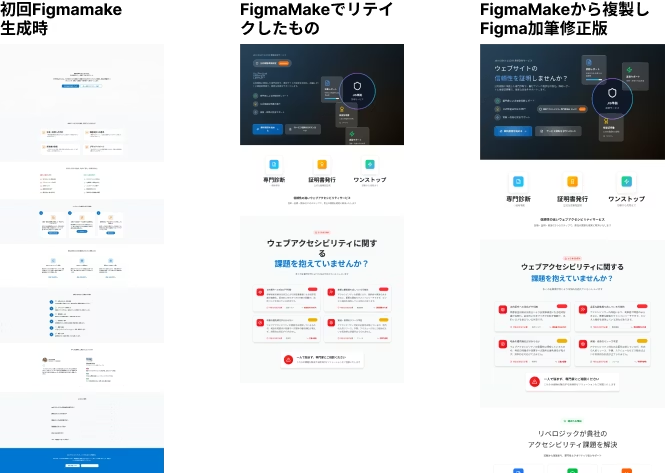
This is another amazing thing about the evolution of AI. If you generate a text using the same prompt now, the accuracy is quite good. You can really feel the progress of AI (see the attached image below).
It's beautiful, educational, and easy to use as a template theme.
However, the president's request

"Let's sprinkle texture into the background!!" "Let's make elements extend beyond the borders." "How about adding diagonal slits?"
such as,Emotional decoration that defies logicOnly.
Every time I try to force a decorative image into the data generated by FigmaMake, Auto Layout starts screaming and the entire layout falls apart.

Inner Voice (Oh no! When I added that background image, the lower section shifted too! FigmaMake, you're not to blame, you're right. But I still can't fully meet the CEO's requirements...!)
The emptiness of having to recreate it by hand
"Make the margins tighter here!" "Make the buttons more jiggly!"
Enter one after anotherDemon comment (in red)To deal with this, I reluctantly disabled the Auto Layout that FigmaMake had created, disassembled the generated components, and rearranged them manually.
A few hours later, all that remained on the screen wasThe design data is completely different and doesn't even resemble FigmaMake.
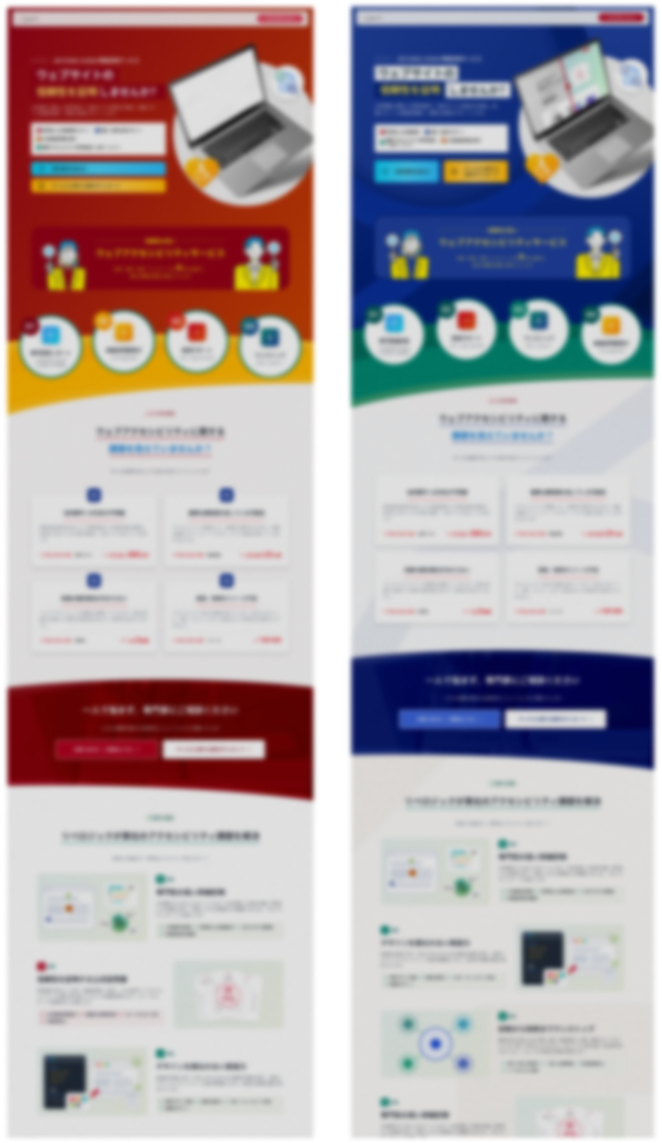
And here is the first draft after various changes. The design is completely different from the first draft.
Furthermore, although all existing elements are auto-layouted, when you copy from FigmaMake to Figma, for some reason the auto-layout is canceled for some parts, which means you have to perform the auto-layout again.
I realized it would take a lot of time to fix it.

Inner Thoughts (Huh? Wouldn't it have been quicker to just do this by hand in Photoshop or Figma from the start...? What was with my lightning-quick three hours...?)
I felt an emptiness when I realized this in the office late at night. And then it was my senior colleague who gave me an energy drink.

Senior: "I'm going home because I've finished work!"
The senior dashes off. He's not going to help me...
Conclusion: FigmaMake's strengths and weaknesses
After going through this mess of fixing, I learned the characteristics of the tool called FigmaMake.
If used in the wrong place, it will actually increase the amount of work required to make corrections.
✅ What FigmaMake is good at (=it finishes super fast)
- Management screen, dashboard UI, app screen, etc.
- Clean grid layouts, forms, tables, etc. are at their best.
- It instantly creates a logical structure, so you can create something of such high quality that you'll think it could be used as is for SaaS management screens (though some tweaking is required, of course).
- Initial wireframe and structure plan
- If you are in the stage of "checking whether there are any elements that are missing or unnecessary," LP can be used just fine (before the design is fully developed).
- It is also very useful as it allows you to create various patterns when you are working out the requirements.
- It was extremely useful for verbalizing the client's requests, giving them form on the spot, and fine-tuning the image.
❌ What FigmaMake is not good at (= manual work required)
- Creating visuals for LP (landing page)
- I'm still not good at creating designs that are appealing with "decorations" and "decorative elements"
- The generated UI is organized and easy to use. You can add decorations like gradients and patterns, but if you don't give clear instructions, the finished product may look like it's from the 2010s.
- It takes time to improve the accuracy of prompts when creating a design.
- The embodiment of the vague nuance of "feels good"
- This still requires the translation skills of human designers.
- If I use the prompts more often, I think I'll be able to create them more smoothly with more precise instructions (I can't do that yet).
Summary: Still, it was an excellent starting point
So,It was difficult to use the generated data from FigmaMake as is for "LP production based on vague instructions from the president"is.
However, as I wrote in my previous article, it was definitely useful in terms of "going from a blank slate to a rough outline in three hours and getting the president to agree to what I wanted." Previously, this would have taken a lot of time, and it would have taken a long time to get the work moving forward.
There was also a request for something "bright and refreshing."Opinions emerged only because there was a starting pointSo that's it (positive thinking).
What I learned this time
- FigmaMake is a professional in creating "structures."
- Decoration is where the designer's skills are put to the test.
- There is no AI yet that can respond to the president's "good feeling."
Next time, I'll try my hand at FigmaMake again by revamping the UI of our internal management tool. (If it's an admin screen... I'm sure it will shine!)
Regarding LP design changes...
Yes, I will continue to work hard on this work by hand!
And speaking of the evolution of AI... Here is the design generated using the same prompts as when creating the first article.
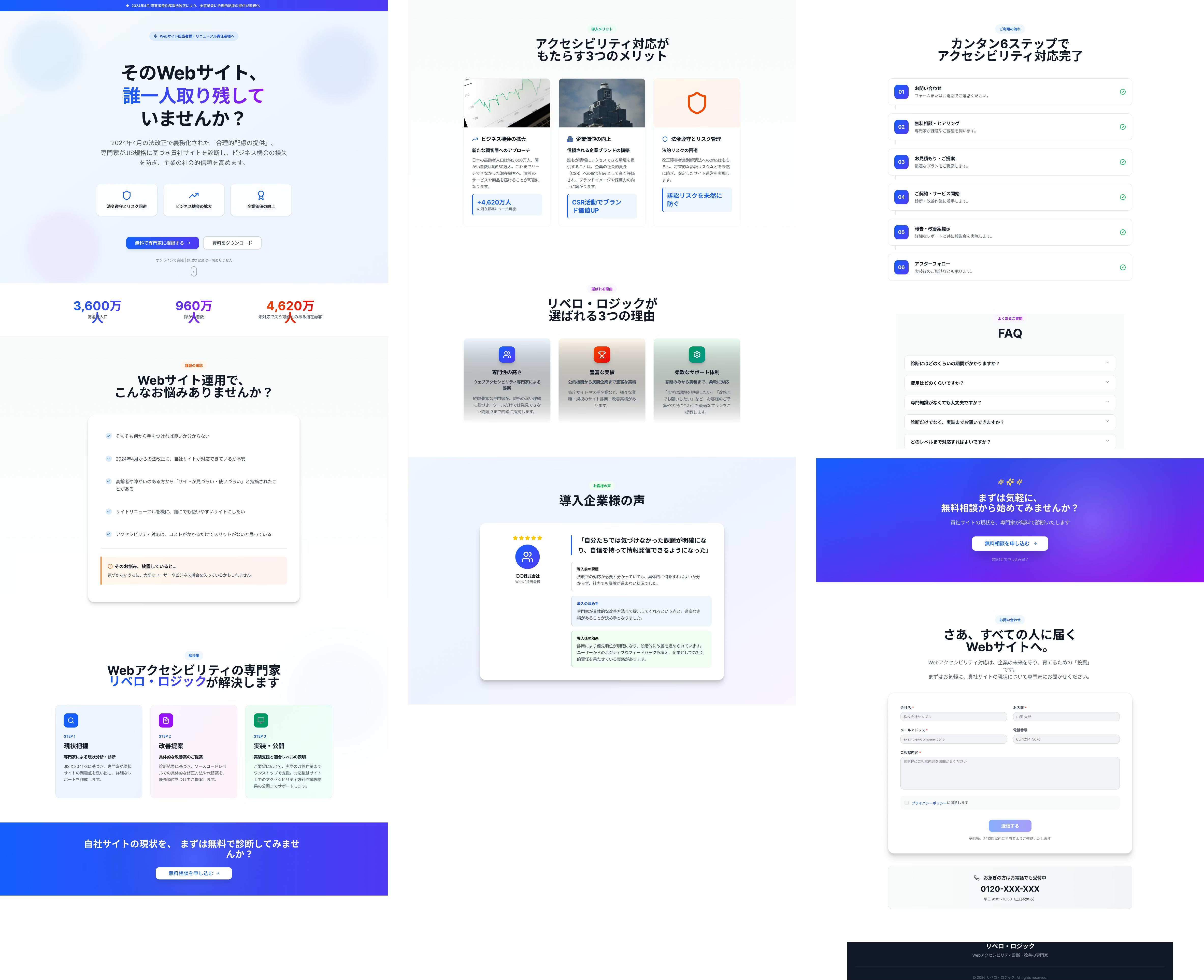
The quality of the initial generation has skyrocketed in just a few months, which is quite surprising.
The explosive increase in accuracy is quite frightening. These days, I want to study design every day so that I don't lose out to the evolution of AI.
andHere is the completed website
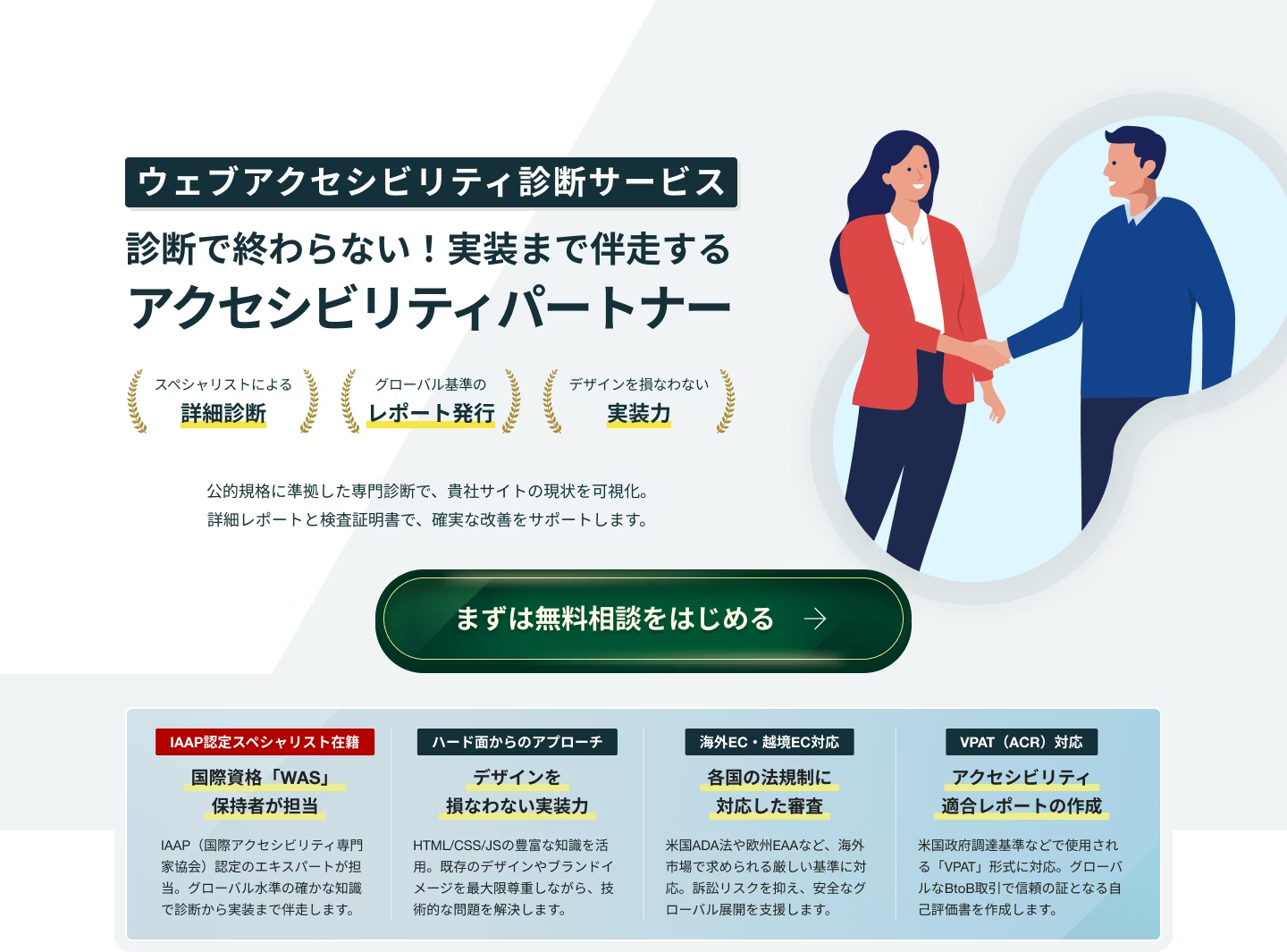
The LP itself is WCAG2.2AA compliantAnd I do,
Lighthouse also scores highly (it takes a little time, but try it out! Sometimes you'll get full marks!)
And mysteriously,Multilingual support!
For multilingual support, please see this articlePlease also check it out!
Browser translation is the norm these days, but it's super convenient to be able to use a translation site at low cost without having to switch!
What do you think?
Don't you think it turned out pretty nicely?🎵

I wrote a lot of different things, but I do feel that having a rough draft in mind helped me reduce the amount of work required!! Previously, I would have spent a lot of time at the WF stage, and then I would have to put it into design and change the content, which saved me a lot of work. Next time I use AI, I'll make sure to generate solid prompts before I try. I also treated myself to a beer as a reward.



UI design is updated every day! I'm also thinking about how to incorporate accessibility into LP design. I've been away from markup lately and have been thinking, "Should I improve my JS as well?" I love Kitamura Takumi!
Hasshi
Web Designer / Joined in 2018 / Kokoro is still a budding designer