
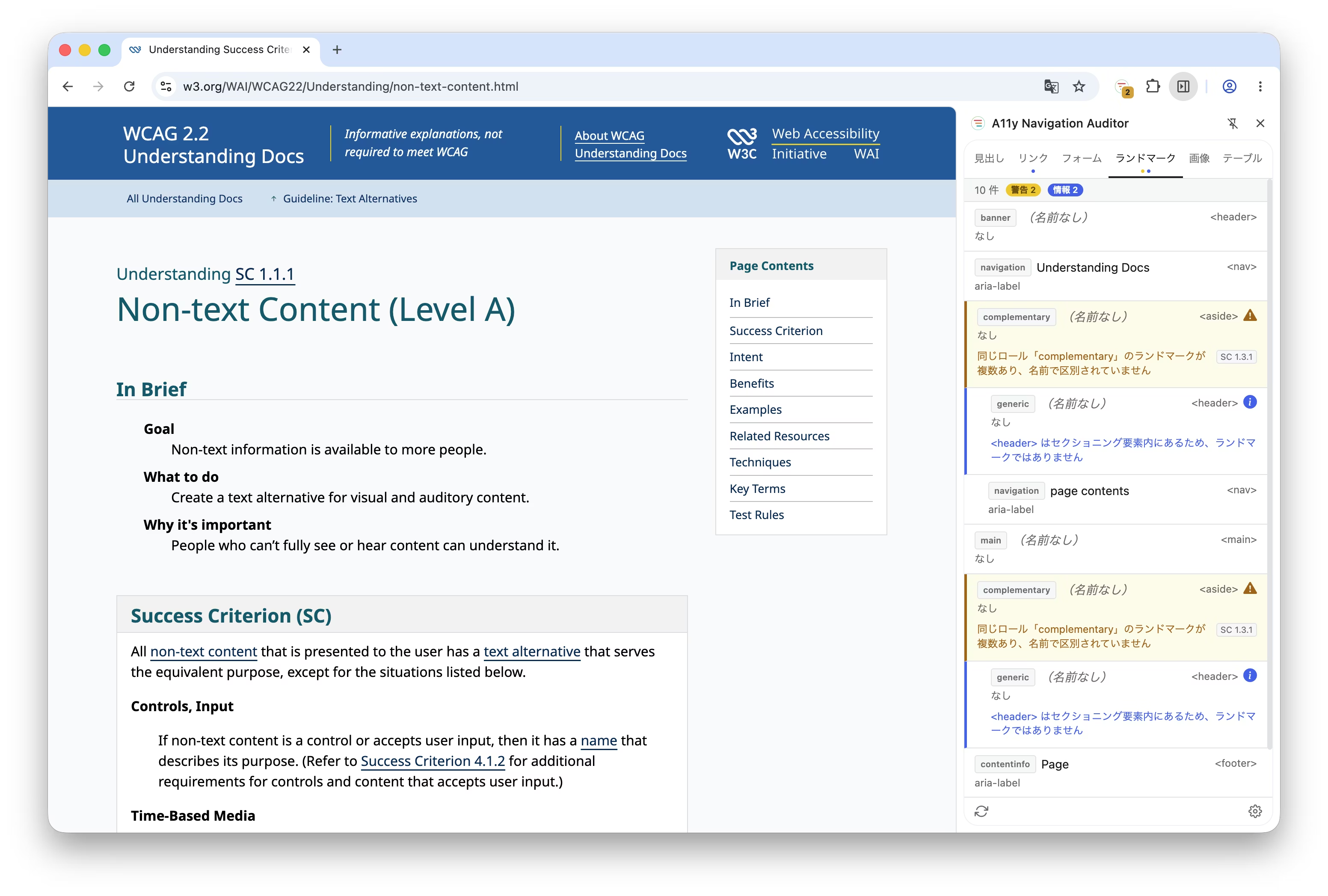
We've released the A11y Navigation Auditor Chrome extension as our second web accessibility tool. It quickly and accurately visualizes the "structure" of websites, providing seamless access to commonly overlooked issues. This tool was developed to support comprehensive structural review and deliver more reliable accessibility diagnostics.
Development Background
There are many tools for diagnosing accessibility.
Tools that handle only specific categories, such as headings and landmarks, fail to provide the complete picture.
Overlay-type tools that place markers on the page let you see the full scope, but clutter the screen and obstruct overview.
We aimed to bridge this gap—creating a tool that captures the whole picture, maintains a clean interface, and enables true overview.
The reference was the element list feature of screen readers, such as VoiceOver's rotor display.
By visualizing this in a side panel and adding problem detection functionality there, we created a developer tool that enables clear, advanced structural diagnostics.
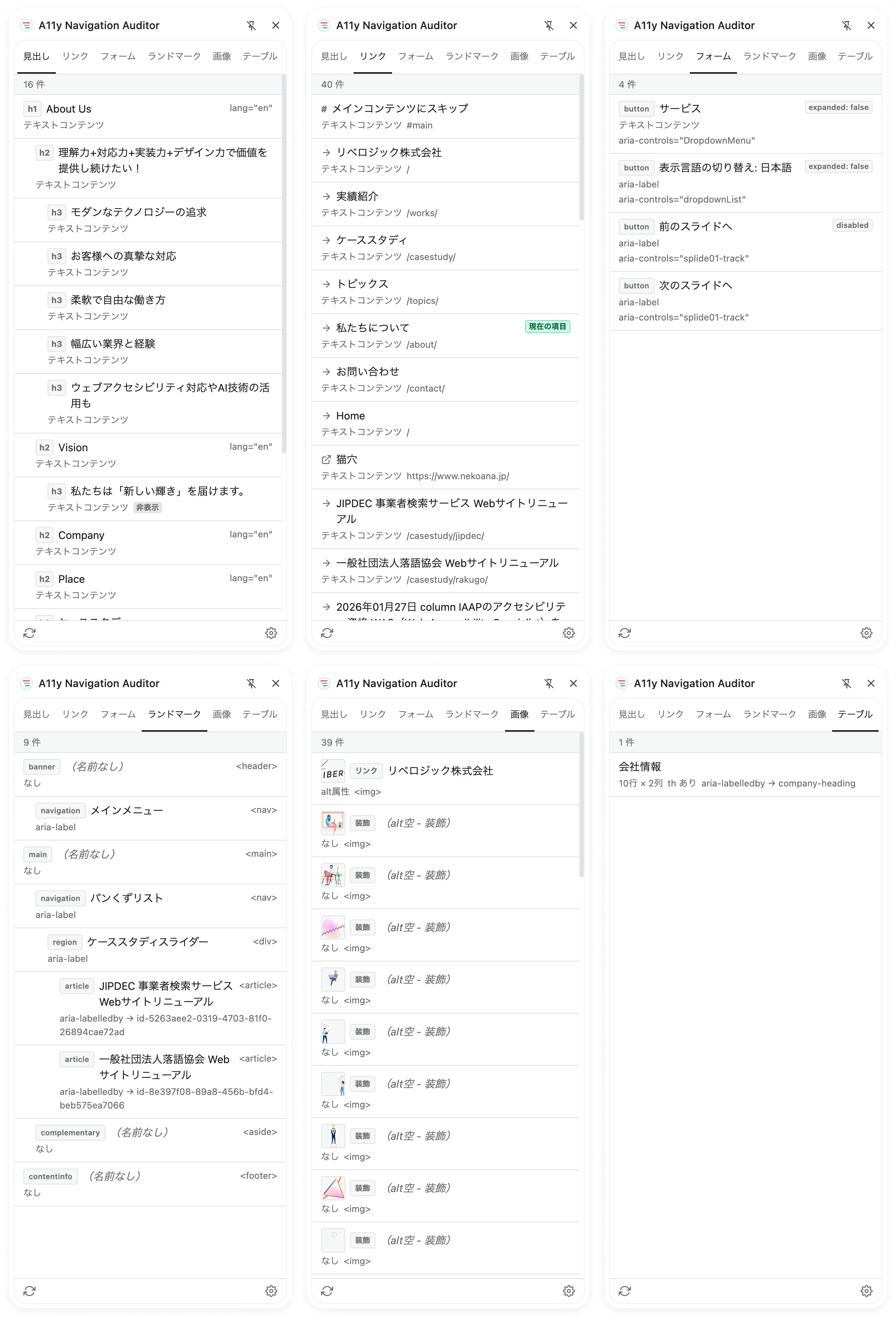
Audit targets and detected issues
▪️
Heading level skips, empty headings, missing roles, and more
▪️Links
empty text, unclear wording, duplicate links, etc.
▪️Form controls:
missing labels, autocomplete attributes, error message associations, and more
▪️Missing
main landmarks, indistinguishable duplicate roles, and deficient sectioning elements
▪️Images:
missing alt attributes, inappropriate alt text (such as "image"), use of file names, etc.
▪️Tables
missing captions or headers, or improper scope/headers attributes in complex structures
Key features
▪️WCAG compliance issue detection
References WCAG success criteria (1.1.1, 1.3.1, 2.4.4, 3.3.1, 4.1.2, etc.) and displays results in three levels: errors, warnings, and information.
▪️Computed Accessible Name Display
Based on ARIA specifications, visualize the name that screen readers actually announce and its derivation source.
▪️Real-time ARIA state monitoring
Automatically detects state changes such as aria-expanded and aria-invalid, as well as dynamic changes in accessible names via aria-label and similar attributes, allowing you to verify accessibility changes instantly as they occur.
▪️Click to highlight —
Simply click an item in the panel to scroll to and highlight the corresponding element. You can also navigate between items using the keyboard's arrow keys.
▪️ Advanced features for professionals
• Toggle hidden element inspection
• Automatic third-party widget exclusion
• Support for Japanese and English
Download A11y Navigation Auditor here
At Liberogic, we aim to make accessibility not a "special accommodation" but a "standard quality."
Following our first tool, "Area Contrast Checker," we've now created "A11y Navigation Auditor" based on features we genuinely needed in our work. True to its name, we're committed to supporting the creation of websites where anyone can navigate smoothly to their destination without confusion.
Making accessibility compliance more accessible and seamless. More tools are in the works, so stay tuned.


