

In our daily work, it's become second nature that whenever we come across something that feels tedious to do manually, we just build a small automation with Claude Code.
This time is a perfect example of that pattern—it all started when our company increased its capital.
Our fiscal year begins in February, and we conducted the capital increase in February as well. With our capital now larger, we realized we needed to strengthen our processes for ordering from external partners and subcontractors more than ever before.
This falls into what's known as subcontracting law—or, under current regulations as of January 2026, the "Appropriate Transaction Act." As the ordering party, we now have more responsibilities: specifying order details, creating and maintaining transaction documents, setting payment dates, and so on.
Of course, this isn't just about compliance because the law requires it!
When we entrust work to external partners, it's important for both the ordering party and the vendor to have clear documentation: order details, amounts, dates, and how they correspond to the quote. (Period.)
It wasn't a feature built into our accounting software
We use MoneyForward (hereafter "MF") for accounting, quotations, and invoicing.
It's convenient for day-to-day accounting and invoicing tasks, but what we needed this time was a bit different.
Generate a Liberogic purchase order PDF based on the quotation PDF we receive from external partners
Within the scope of what we use, MoneyForward doesn't have quite the right features for this, and it wouldn't make sense to subscribe to a service just for that anyway.
If it were to be done manually:
- Create a purchase order template
- Manually transcribe details from the quote into the purchase order template
- Enter the order date
- Transcribe the quote number
- Transcribe the line items
- Verify the total amount and other details
- Format the file name
- And so on...
It's tedious, right, having these tasks pile up... So we decided to build something to handle it.
Made it production-ready in just under an hour with Claude Code
The timing worked out well too.
The start of February, increased funding in February, and the release of Claude Code with adoption across our team all converged.
We were in the middle of a hackathon-style push internally—using Claude Code to complete process improvement tools, small internal apps, and even deploy ambitious ideas.
From simple spec clarification to instructions for Claude Code, including fine-tuning adjustments...
We got it to a usable state in just under an hour.
Of course, you can't just throw everything at AI and expect it to work, but when you properly translate the requirements into prompts, it's fast and convenient!
Desktop application completed
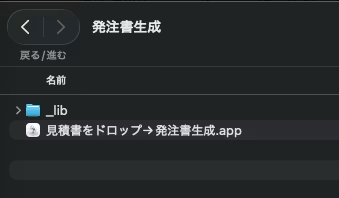
A simple purchase order generation tool that probably runs on operating systems you're already using.
Drag and drop a quote PDF into a dedicated .app, and a Python script runs to read the quote PDF contents and generate a purchase order PDF in the same folder.
Once complete, it sends a macOS notification and automatically opens the generated purchase order PDF.
The structure looks like this:
~/Desktop/発注書生成/
 見積書をドロップ→発注書生成.app
 _lib/
  generate_purchase_order.py
  liberogic_logo.png
  liberogic_seal.png
  purchase_order_counter.json
I wanted accounting and administrative staff to use it without opening the terminal, so I made AppleScript droplets the entry point and handle the actual PDF generation on the Python side.
In short, it's a desktop app where you drag and drop a quote PDF and get a purchase order PDF out. Since it works without opening the terminal, it's easy to use in internal administrative workflows.
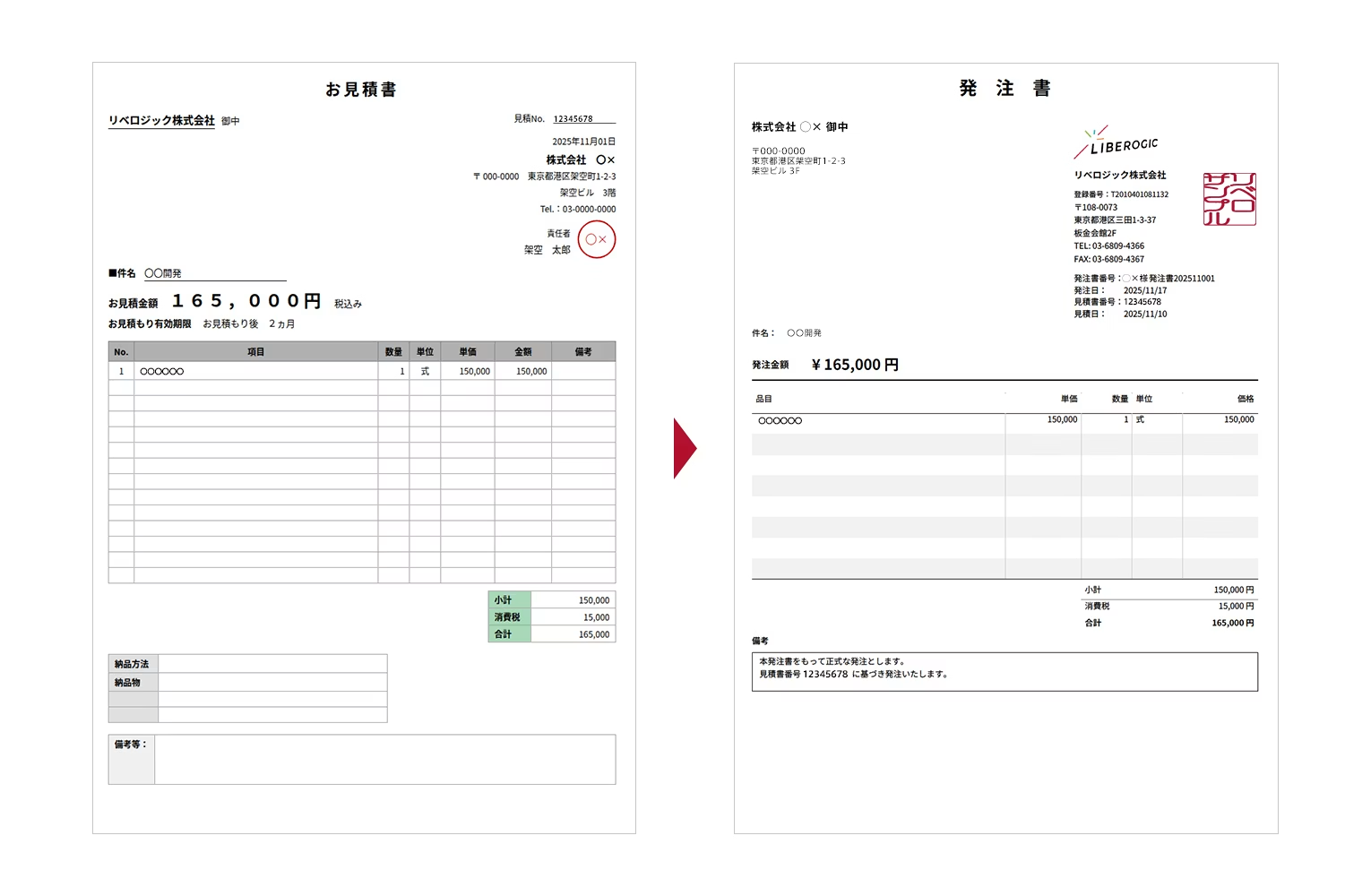
The purchase order PDF design follows the Manefo format invoices and quotes we use in-house.
The remarks section includes the following text:
This purchase order constitutes a formal order. We place this order based on quote number XXX.
The purchase order number format is as follows:
{Company Abbreviation} Purchase Order {YYYY}{MM}{3-digit Sequential Number}
For example, for the first order for 〇〇 in February 2026:
〇〇 Purchase Order 202602001
will look like this.
Sequential numbering by company and month is managed in purchase_order_counter.json, and the purchase order date is automatically calculated as 5 business days after the quotation date. (This is just a provisional specification for now! We'll change it under management later!)
To exclude not just weekends but also Japanese public holidays, we used Python's jpholiday.
A slightly tricky part
The quotation that serves as the basis for the purchase order comes from external partners and cooperating companies, so the format varies by company.
Simply hardcoding "the company name is at this coordinate" or "the total amount is at this position" won't work.
In the end, using regular expressions, we extract as flexibly as possible: vendor name, address, phone number, quotation number, quotation date, subject, line items, subtotal, consumption tax, total, and so on. We treat companies with "attn:" as our own and others as vendors, and when text is extracted from PDF, information that appears separated visually can end up concatenated in text form.
There were cases where building names or floor numbers mixed into the subject line, so we added processing to remove unnecessary address information using clues like "building" and "floor" notation.
AI or not, this remains a typical PDF processing challenge.
The prompt we gave to Claude Code
Rather than vague requests, writing out folder structure, processing flow, layout, numbering rules, business day calculation, PDF extraction items, and so on as concretely as possible results in more economical token consumption.
Let's have them read sample PDFs too!
以下の条件で、見積書PDFを発注書PDFに自動変換するツールをmacOS向けに作ってください。

## 環境

- macOS / Python3(pip可)
- フォント:`~/Library/Fonts/NotoSansJP-Regular.ttf` / `NotoSansJP-Bold.ttf`

## フォルダ構成

`~/Desktop/発注書生成/
  見積書をドロップ→発注書生成.app
  _lib/
    generate_purchase_order.py
    liberogic_logo.png
    liberogic_seal.png
    purchase_order_counter.json`

## 処理フロー

1. `.app` に見積書PDFをドラッグ&ドロップ
2. Pythonスクリプトを実行し発注書PDFを生成
3. 完了通知(macOS通知)を出して発注書PDFを自動で開く
4. 発注書PDFは見積書と同じフォルダに保存

## 発注書の仕様

出力フォーマットは添付のMoneyForward形式のPDFに合わせること。

このPDFから以下を抽出して使う:

- ロゴ画像
- 押印画像
- レイアウト座標
- 列幅
- 余白
- フォントサイズ

## 自社情報

リベロジック株式会社
登録番号:T2010401081132
〒108-0073 東京都港区三田1-3-37 板金会館2F
TEL: 03-6809-4366 / FAX: 03-6809-4367

## 発注書番号

- 形式:`{会社略称}様 発注書{YYYY}{MM}{3桁連番}`
- 会社別・月別の連番を `purchase_order_counter.json` で管理
- 出力ファイル名もこの発注書番号に揃える

## 発注日

- 見積書の日付から5営業日後
- 土日と日本の祝日を除外する

## 見積書からの情報抽出

- どんな会社のフォーマットでも対応できる柔軟な正規表現で抽出
- 抽出項目:ベンダー名・住所・TEL、見積書番号、見積日、件名、明細、小計・消費税・合計
- ベンダー判定:「御中」の付いた会社=自社、それ以外=発注先
- 件名に住所の建物名が混入するケースに対応

## 発注書レイアウト

- タイトル「発注書」中央大文字
- 左:発注先の社名・住所・TEL
- 右:自社情報+ロゴ+押印+発注書番号・発注日・見積書番号・見積日
- 件名・発注金額を大きく表示
- 明細テーブル:品目/単価/数量/単位/価格
- 交互グレー背景
- 最低8行
- 合計エリア:小計・消費税・合計のみ
- 備考欄を枠付きで表示
- ページ番号なし
While it's essentially a simplified specification document, the key is to pass along business constraints and completion vision as concretely as possible rather than just saying "make it look nice."
Ultimately, feeding Claude a different format sometimes causes failures, so we still need to push it a bit harder—but it's fast enough that it works out.
(The external staff and partner companies we work with don't even add up to two digits, so it's not a big deal!)
Convenience requires security mindfulness too
When using AI development support, it's important to think about security alongside convenience.
As you work through instructions with Claude Code, various operations are performed on your local environment.
- ~/Desktop へのファイル読み書き
- ~/Library/Services/ へのアクセス検討
- pip install によるPythonライブラリの追加
- osacompile によるAppleScriptアプリの生成
- ~/Library/Fonts/ にあるフォントファイルの読み取り
This may not be a major concern, but giving AI execution permissions on your local environment is understandably scary 😨
When delegating terminal operations or file operations, there's a risk of unintended file creation, overwriting, or deletion, so
- Verify what you're allowing!
- Back up your data!
- Check diffs for anything under git management!
- Use separate folders for development work!
These basic precautions are essential. If you're using it for development work, it might be worth loading your .env file through 1password instead. It's tedious, but it makes a real difference. (by our CTO)
On the other hand, when used exclusively in a local environment as in this case, the risk is relatively limited. There is little impact spreading externally through the network, and most cases remain within the scope of "at worst, only my own environment is affected."
There are many other considerations, but "building quickly" and "using safely" are separate matters. When proceeding with AI-assisted development, be sure to verify execution permissions, file operations, external libraries, and how input data is handled!
Next: staff sharing and Supabase integration
Well, what we built this time is a simple purchase order generation tool that runs in a local environment.
In the initial phase, we used purchase_order_counter.json to manage sequential numbers by company and month, but considering future sharing and use with staff, if we rely solely on local JSON files to manage sequential numbers, naturally we'd run into issues like duplicate purchase order numbers.
So we'll implement counters by company and month on the Supabase side to ensure no overlapping sequential numbers even with multiple users, and we also plan to add features like purchase order issuance history, vendor information, quotation numbers, order amounts, order dates, and PDF storage paths!



A CEO who always acts as a true counterpart. Someone who loves understanding new technologies, finds joy in those moments when something becomes more convenient, and is a hands-on person who dives deep into projects. Excited about the technologies of tomorrow, enjoying new experiences at every stage of life.
Tadanori Morimoto
Project Manager / Director / Founded in 2007