

After implementing Claude Code in-house, I wanted to create something useful for work, so I built a VSCode extension that monitors for typos and tag errors right in the editor!
I've summarized the journey from "it would be nice to have this feature" to implementation!
Background
I was struggling with careless mistakes during implementation, like forgetting to add alt="", or mixing full-width and half-width characters.
I thought it would be great to have a tool like this, so I started by pitching the idea in a conversational format with Claude.

I want to create an app that prevents careless mistakes—for example, one that highlights differences in a browser or flags code errors!
- Code Review Checklist | Custom checklist to review before submission
- HTML/CSS Visual Diff | Paste two pieces of code and visualize the differences
- Screenshot Diff Checker | Compare images before and after fixes pixel-by-pixel
- Live HTML/CSS Error Reviewer | Paste code and AI flags issues
They made some suggestions, so I decided to submit additional requests

It's great that AI flags issues!! But instead of just pasting code, I want real-time monitoring in VSCode or the ability to review after work is done!
We decided to build it as a VSCode extension rather than a browser app.
Real-time monitoring seemed to have high API costs, so we adopted post-work review via command execution.
Claude API was initially proposed, but since it requires a paid subscription, we decided to use GitHub Copilot, which we already have a contract for.
In summary, it's an extension that retrieves git diff after work is done, sends a prompt to GitHub Copilot, and automatically detects careless mistakes.
How it works
When work is done, click the status bar button
↓
Retrieve git diff HEAD and compare the changes
↓
Parse the diff to extract modified files and line numbers
↓
Send diff + prompt to GitHub Copilot (vscode.lm API)
↓
Copilot returns review results in JSON format
↓
Display review results in the VSCode view
↓
Click the line number of a flagged issue to jump to that file and line
↓
Accumulate patterns detected by AI
The screen looks like this.
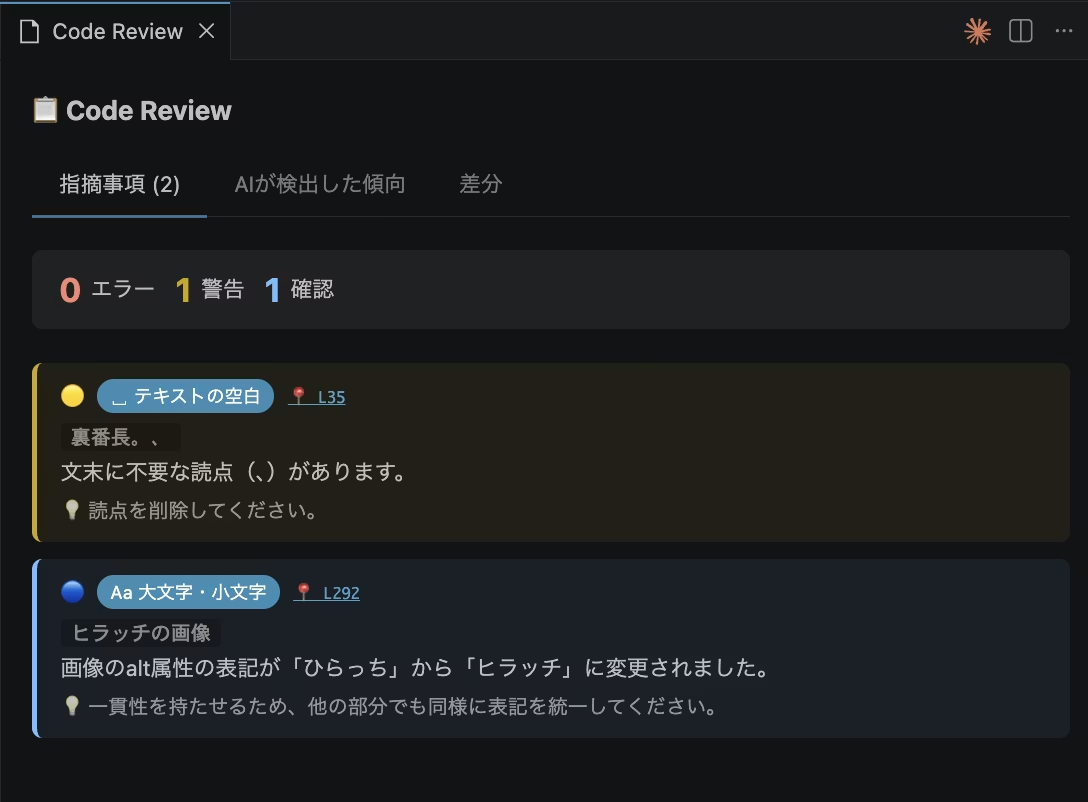
Once you've completed all the work, launch the Code Review extension before committing to GitHub. It compares the differences with your previous commit and checks for anything that looks wrong.
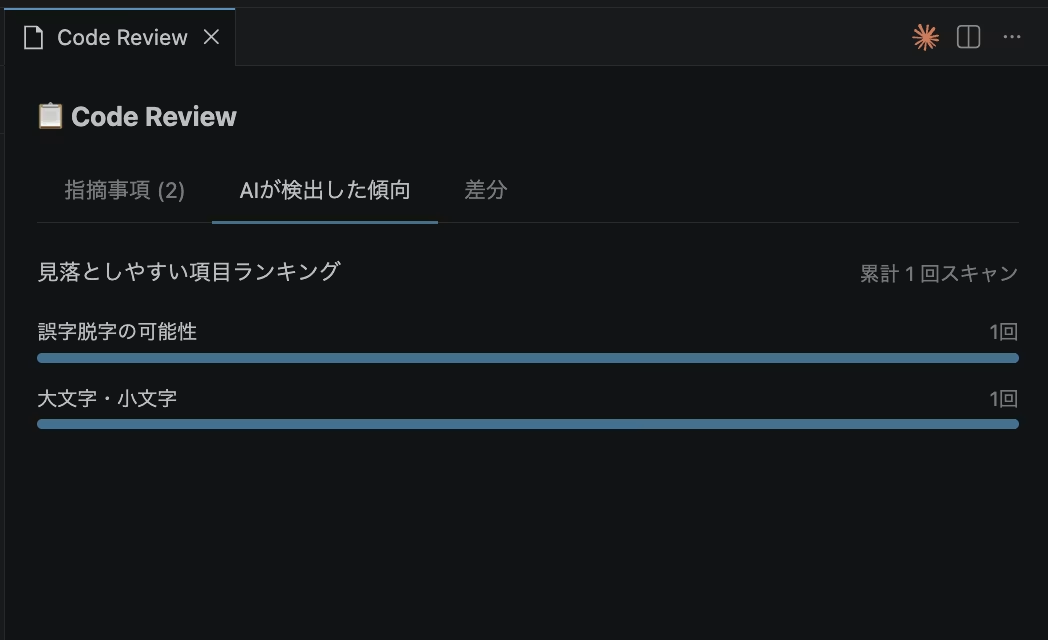
AI-detected patterns are stored in persistent storage, making your own common mistakes visible and measurable.
Here's what the prompt looks like.
チェック観点:
- テキスト内の不自然なスペース(全角・半角スペースの混入など)
- 大文字・小文字の不統一(クラス名・テキストなど)
- 誤字脱字の可能性がある箇所
- 括弧・記号の全角・半角混在(例: ()・() のように開き括弧と閉じ括弧で全角半角が混ざっている、テキスト中に全角の()[]{}が使われているなど)
- <a> の href属性が "#" のままになっている(未設定・仮置きの可能性)
- HTMLのネスト構造の意味的な違反(以下は特に重点チェック):
  - <ul>・<ol> の直下に <li> 以外の要素(<div>など)が入っている
  - <h1>〜<h6> の中に <div>・<p>・<section> などブロック要素が入っている
  - <p> の中に <div>・<ul>・<table>・<h1>〜<h6> などブロック要素が入っている
  - <a> の中に <a> がネストしている
  - <button> の中に <button>・<a>・<input> などインタラクティブ要素が入っている
  - <tr> の中に <td>・<th> 以外の要素が入っている
By adding to this and updating the extension, you can focus checks on your specific mistake patterns, and performance improves continuously!
Technical implementation
This extension is built using only TypeScript + VSCode standard API + Node.js standard features—no external libraries at all. The file structure is also simple, with just five main .ts files.
VSCode's standard API includes vscode.lm (Language Model API), a feature that lets you call GitHub Copilot's model directly. With this, you can implement AI review without needing API keys from Anthropic or OpenAI, but since it's a relatively new API with limited official documentation, normally you'd spend significant time just investigating the specification.
By asking Claude Code "How do I call Copilot's model from a VSCode extension?" while implementing, I was able to understand concrete implementation methods on the spot—like how to use vscode.lm.selectChatModels() and how to receive streaming responses (for await (const chunk of response.text))—without needing to deep-dive into documentation.
Similarly, by checking with Claude Code as I went along—for bidirectional communication in WebviewPanel (sending and receiving messages between Webview and Node.js) and the persistent storage mechanism using context.globalState—I was able to significantly cut down the time spent digging through documentation.
Summary
This time, we explored building a VSCode extension to catch careless mistakes all at once before committing.
By combining git diff with Copilot, you can reduce oversights while expanding your review criteria—essentially building your own personalized tool that adapts to your mistake patterns.
I discovered that VSCode extensions are surprisingly easy to build using VSCode's standard API. Without Claude Code, I'd never have thought to create an extension! (laughs)
While understanding code structure and logic is certainly important, sometimes letting AI handle everything and just building something hands-on reveals ideas and discoveries you wouldn't otherwise find.



I focus on frontend development with markup, JavaScript, React, and Next.js. I'm always happy when a site I've worked on goes live successfully! My hobbies are playing guitar, and I love cats and roasted sweet potatoes 🐱🍠
Hiraicchi
Frontend Engineer / Joined 2022